Product Description

NUC MTN-AL50 Product Description

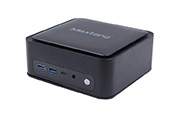
The Maxtang MTN-AL50 NUC offers Intel® Core™ i5-1240P, Core™ i5-12450H, and Core™ i7-13620H processor options in a 127 × 129 × 55 mm chassis. It combines dual-channel DDR5 memory, HDMI 2.1, DisplayPort 2.1, and Thunderbolt™ 4 for triple-display applications. Dual 2.5GbE LAN, two M.2 SSD slots, and an M.2 slot for an optional Wi-Fi and Bluetooth module provide connectivity and expansion for office workstations, digital signage, education, and small-business deployments. The MTN-AL50 uses active cooling and supports Windows 10/11 64-bit and Linux 64-bit.

Features

    NUC MTN-AL50 Features

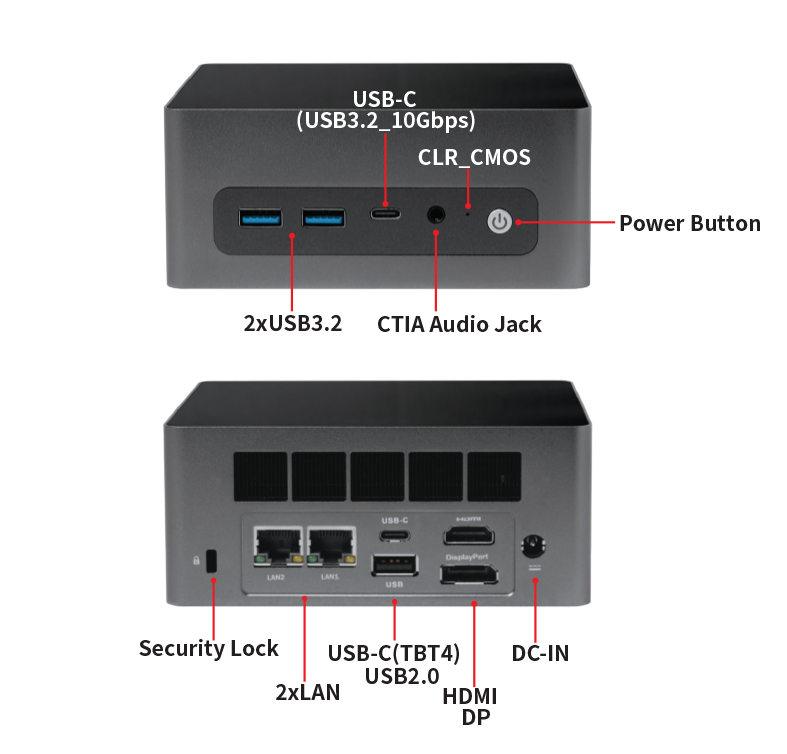
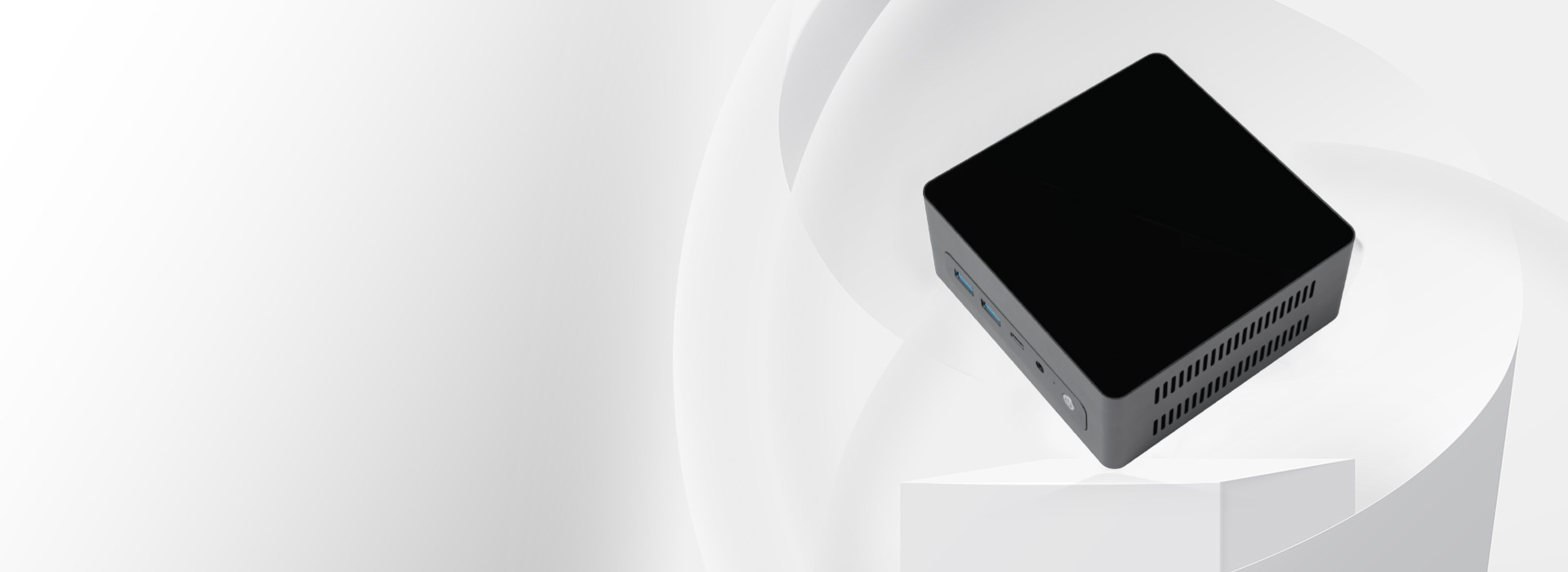
    MTN-AL50 front picture.jpg
    • CPU: 12th/13th Gen Intel® Alder Lake/Raptor Lake Processor

    • Memory: Dual Channel DDR5 for Memory up to 64GB

    • Display: Integrated Intel® Iris® Xe/UHD Graphics, HDMI+DP+Thunderbolt™ 4

    • I/O Ports: 2xUSB-C(1*TBT4+1*USB3.2_10Gbps), 2xUSB3.2, 1xUSB2.0, 2xLAN(2.5GbE), Audio

    • Storage&Expansion: 1xM.2_Key M Slot for 2280 NVMe SSD, 1xM.2_Key M Slot for 2280 NVMe/SATA SSD, 1xM.2_Key E Slot for 2230 WiFi and Bluetooth

    • Power: 19V/20V DC-in

Intel Core Processor Options and DDR5 Memory Expansion

Choose the Core Configuration Your Software Needs
The MTN-AL50 offers Intel® Core™ i5-1240P with 12 cores and 16 threads, Core™ i5-12450H with 8 cores and 12 threads, or Core™ i7-13620H with 10 cores and 16 threads. Select the processor configuration around your office software, content workload, and multitasking requirements. Dual-channel DDR5 SO-DIMM memory supports up to 64GB with either Core™ i5 option and up to 96GB with Core™ i7-13620H, allowing memory capacity to match the selected platform.

 Triple-Display NUC for Office Workspaces, Digital Signage and Education

More Workspace for Business Applications
Use the MTN-AL50 NUC for multi-screen office work, presentation systems, digital signage, or teaching workstations. HDMI, DisplayPort, and Thunderbolt™ 4 provide triple-display output, giving projects several ways to connect screens. Its 127 × 129 × 55mm footprint suits desks and equipment installations with limited space. Select the processor and memory configuration for your software, and confirm the required screen resolutions, refresh rates, cables, and adapters before deployment.

Triple-Display NUC for Office Workspaces, Digital Signage and Education

More Workspace for Business Applications
Use the MTN-AL50 NUC for multi-screen office work, presentation systems, digital signage, or teaching workstations. HDMI, DisplayPort, and Thunderbolt™ 4 provide triple-display output, giving projects several ways to connect screens. Its 127 × 129 × 55mm footprint suits desks and equipment installations with limited space. Select the processor and memory configuration for your software, and confirm the required screen resolutions, refresh rates, cables, and adapters before deployment.

Built-in Wi-Fi

Built-in Wi-Fi
Fast wireless connectivity

Built-in Bluetooth

Built-in Bluetooth
Data transmission convenient
Technical Parameters

NUC MTN-AL50 Specification

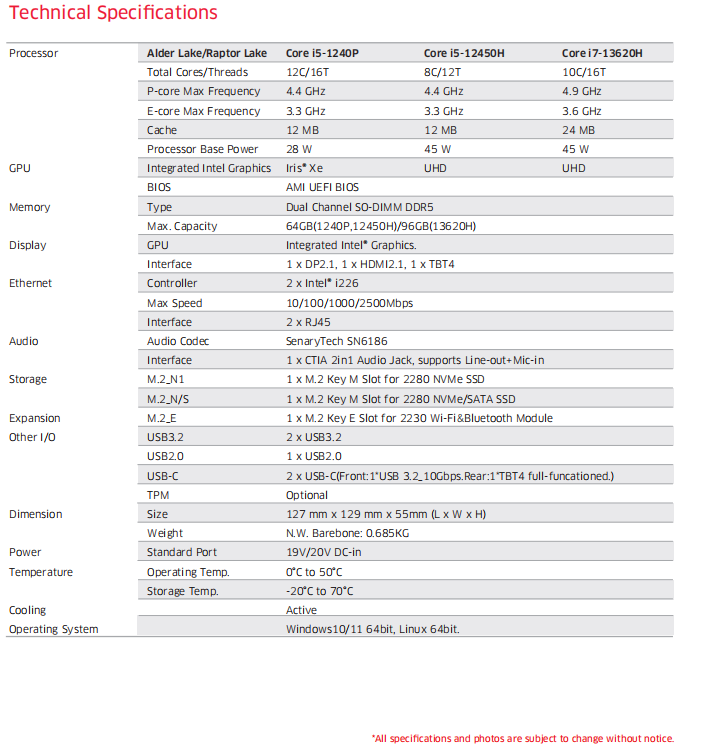
Specifications.png

HDMI Logo

*Product has High-Definition Multimedia Interface. All specifications are subject to change without notice.

*The terms HDMI, HDMI High-Definition Multimedia Interface, HDMI Trade dress and the HDMI Logos are trademarks or registered trademarks of HDMI Licensing Administrator, Inc.

*All data is for information purposes only and is not guaranteed for legal purposes. Information has been carefully checked and is believed to be accurate; however, no responsibility is assumed for inaccuracies.

*All other trademarks or registered trademarks are the property of their respective owners and are recognized.

FAQ

  • What processors are available for the MTN-AL50?

    The MTN-AL50 supports Intel® Core™ i5-1240P with 12 cores and 16 threads, Core™ i5-12450H with 8 cores and 12 threads, or Core™ i7-13620H with 10 cores and 16 threads. Integrated graphics and supported memory capacity vary by processor. Select the configuration according to your software and project requirements.
  • Does the MTN-AL50 support 64GB or 96GB of memory?

    The limit depends on the processor configuration. The detailed specification table lists up to 64GB of dual-channel DDR5 SO-DIMM memory for Core™ i5-1240P and Core™ i5-12450H, and up to 96GB for Core™ i7-13620H. Confirm the required capacity and compatible modules when ordering; 96GB is not supported across every configuration.
  • How many displays does the MTN-AL50 support?

    The datasheet specifies triple-display output through one HDMI port, one DisplayPort, and one Thunderbolt™ 4 port. The interface table lists HDMI 2.1 and DisplayPort 2.1, but does not provide a resolution and refresh-rate matrix for all three screens. Confirm your required display combination, cables and adapters with Maxtang before deployment.
  • Do both USB-C ports support Thunderbolt 4 or USB-C power input?

    No. The rear USB-C port is specified as Thunderbolt™ 4, while the front USB-C port is specified as USB 3.2 at 10Gbps. The documented system power input is 19V/20V DC. The datasheet does not state USB PD input support or a charging wattage, so confirm any USB-C power requirement with Maxtang rather than assuming both ports have identical functions.
  • What internal storage options does the MTN-AL50 provide?

    The MTN-AL50 includes two M.2 Key M 2280 SSD slots. One supports NVMe SSDs only; the second supports NVMe or SATA SSDs. This allows two internal drives to be configured around application and storage requirements. Check the protocol of each SSD when selecting drives for the two slots.
  • What networking options are available?

    Two Intel® i226 controllers provide two RJ45 ports supporting 10/100/1000/2500Mbps Ethernet. An M.2 Key E 2230 slot supports an optional Wi-Fi and Bluetooth module. The two LAN ports can connect to separate networks or devices, but routing, bridging and other network functions depend on the operating system and software configuration.
  • What are the dimensions and barebone weight?

    The MTN-AL50 measures 127 mm × 129 mm × 55 mm and has a specified barebone weight of 0.685 kg. Allow extra space for cable access and ventilation when planning a desk, cabinet or equipment installation. Mounting requirements should be confirmed separately.
  • Which operating systems does the MTN-AL50 support?

    The datasheet lists Windows 10/11 64-bit and Linux 64-bit support. Confirm the required operating-system version, Linux distribution, driver availability and application compatibility for your selected processor configuration before ordering.
  • What cooling method and operating temperature range are specified?

    The MTN-AL50 uses active cooling and operates from 0°C to 50°C. Its storage temperature range is -20°C to 70°C. Maintain ventilation clearance and consider the temperature inside the installation area, particularly when the NUC is placed in a cabinet or alongside other heat-producing equipment.
  • What applications is the MTN-AL50 designed for?

    The MTN-AL50 is designed for office productivity, digital signage, education, collaboration, and small-business computing. Its triple-display connectivity, dual 2.5GbE LAN and dual M.2 storage support projects that need several screens, wired network connections and local storage in a NUC form factor.
Get a Quick Quote!
We are happy to serve you!
Your Name *
Your Phone
Your Email *
Your Country *
Detailed Requirement *